Evaluating and Improving RAG Retriever With Llama-index
Introduction
In this article, we’re diving into one of the core pieces of any RAG pipeline: the retrieving step. Retrieving is the part where we pick out the chunks that have the highest chance of helping the LLM answer a user’s query.
In this article, we’re going to:
- Define a retriever using LlamaIndex (we’ll use ChromaDB as an in-memory vector store)
-
Define a few metrics to measure how good a retriever is
-
Define the evaluation process for a retriever
-
Switch the embedding model (use a weaker one and see what happens)
-
Add reranking on top of the retriever and see how it affects the metrics
You can run all the code yourself in this Google Colab.
Prerequisites
You’ll need an OpenAI API token. If you don’t have one yet, just create an OpenAI account and generate a token (here).
PS: I’ll be using OpenAI at a minimum, so this tutorial shouldn’t cost you a fortune (under 0.10$).
1. Install dependencies
To run this tutorial, we need to install the following dependencies:
!pip install -q llama-index==0.14.8 llama-index-embeddings-huggingface==0.6.1 openai==2.8.1 llama-index-vector-stores-chroma==0.5.32. Download dataset
We’ll start by downloading the well-known LlamaIndex dataset: PaulGrahamEssayDataset.
!pip install -q llama-index==0.14.8 llama-index-embeddings-huggingface==0.6.1 openai==2.8.1 llama-index-vector-stores-chroma==0.5.3We can now load it into memory.
from llama_index.core import SimpleDirectoryReader

documents = SimpleDirectoryReader("./data/source_files").load_data()3. Setup LlamaIndex
Now let’s set up our LlamaIndex environment: we’ll configure the text splitter and the embedding model.
For the embedding model, we’re using a free and efficient Hugging Face model that’s supposed to give solid performance (embedding size = 383). If you want more details, check out the model page.
import os
from llama_index.core import Settings
from llama_index.embeddings.huggingface import HuggingFaceEmbedding

# we start by setting a classic nodes parser
node_parser = Settings.node_parser
Settings.chunk_size = 512
Settings.chunk_overlap = 64

# we set a free and small hf embed model
Settings.embed_model = HuggingFaceEmbedding(model_name="BAAI/bge-small-en")Next, we set up the storage layer: we’ll use in-memory ChromaDB to store the embeddings.
import chromadb
from llama_index.core import StorageContext, VectorStoreIndex
from llama_index.vector_stores.chroma import ChromaVectorStore

chroma_client = chromadb.EphemeralClient()
chroma_collection = chroma_client.create_collection("retriever_evaluation")
vector_store = ChromaVectorStore(chroma_collection=chroma_collection)

storage_context = StorageContext.from_defaults(vector_store=vector_store)
index = VectorStoreIndex.from_documents(
    documents, storage_context=storage_context
)At this stage, documents are split into chunks, embedded, and stored in ChromaDB.
Let’s take a closer look:
all_nodes = vector_store.get_nodes(node_ids=None)
print("nodes number: ", len(all_nodes))
print("node example:", all_nodes[1])nodes number: 40
node example: Node ID: 300402ca-42d0-4958-8905-491aabc6667c
Text: With microcomputers, everything changed. Now you could have a
computer sitting right in front of you, on a desk, that could respond
to your keystrokes as it was running instead of just churning through
a stack of punch cards and then stopping. [1] The first of my friends
to get a microcomputer built it himself. It was sold as a kit by
Heathkit....We can now create the retriever.
retriever = index.as_retriever(similarity_top_k=2)Generally, a good retriever is one that returns the most relevant chunks to help answer a user’s question. If the retriever does a good job, the LLM gets the right context and we minimize hallucinations.
4.1 Evaluation process
To evaluate whether a retriever returns the right nodes for a given query, we need to generate a dataset (ground truth) of (question, relevant_node) pairs.
The idea is :
-
Generate a question for each node, based solely on the node’s content
-
Send each question to the retriever
-
Compare the nodes it returns with the ground truth nodes
To generate the dataset, we ask an LLM to create one or several questions for each node. LlamaIndex provides a helper function for this: generate_question_context_pairs.
Under the hood, it uses the following prompt to generate n questions per node:
DEFAULT_QA_GENERATE_PROMPT_TMPL = """\ Context information is below. --------------------- {context_str} --------------------- Given the context information and not prior knowledge. generate only questions based on the below query. You are a Teacher/ Professor. Your task is to setup \ {num_questions_per_chunk} questions for an upcoming \ quiz/examination. The questions should be diverse in nature \ across the document. Restrict the questions to the \ context information provided." """import os
from llama_index.llms.openai import OpenAI
from llama_index.core.evaluation import generate_question_context_pairs
os.environ["OPENAI_API_KEY"] = "<YOUR_OPENAI_API_KEY>"
generate_questions_llm = OpenAI(model="gpt-3.5-turbo", temperature=0)
qa_dataset = generate_question_context_pairs(
all_nodes, num_questions_per_chunk=2, llm=generate_questions_llm)
print("Number of generated queries:", len(qa_dataset.queries))
print("Here is an example of a query and its associated relevant node")
query_id_example = list(qa_dataset.queries.keys())[10]
query_example = qa_dataset.queries[query_id_example]
print("Query: ", query_example)
relevant_docs_ids = qa_dataset.relevant_docs[query_id_example]
relevant_docs = vector_store.get_nodes(node_ids=relevant_docs_ids)
print("Relevant node: ", relevant_docs[0].text[0:1000], "...")Number of generated queries: 80 Here is an example of a query and its associated relevant node Query: What was the author's initial perception of the possibility of making art, and how did this perception change over time? Relevant node: And as an artist you could be truly independent. You wouldn't have a boss, or even need to get research funding. I had always liked looking at paintings. Could I make them? I had no idea. I'd never imagined it was even possible. I knew intellectually that people made art â that it didn't just appear spontaneously â but it was as if the people who made it were a different species. They either lived long ago or were mysterious geniuses doing strange ...4.2 Metrics
Now let’s look at the important technical part. LlamaIndex provides several built-in metrics to evaluate how good a retriever is.
-
Hit-rate: percentage of times the retriever returns at least one relevant node.
Higher top-k → higher hit-rate (but at the cost of more tokens and a higher chance of misleading the LLM). -
MRR (Mean Reciprocal Rank): measures how high the first relevant document appears in the ranking. It captures two things:
-
Did you retrieve a relevant document?
-
How high did you place it?
-
-
Precision: percentage of returned nodes that are relevant. In our setup, this metric is basically capped since we assume there’s only one relevant node.
-
Recall: how many of the relevant documents you retrieved. Same as precision, we drop it since it correlates with hit-rate here.
-
AP (Average Precision): scans all nodes (before applying top-k) and measures the average rank of relevant nodes. In our setup, it ends up equal to MRR.
Now that we have a dataset (ground truth) and the retriever’s answers, we can run the evaluation.
LlamaIndex provides the RetrieverEvaluator class for that.
from llama_index.core.evaluation import RetrieverEvaluator

metrics = ["hit_rate", "mrr"]
retriever_evaluator = RetrieverEvaluator.from_metric_names(metrics, retriever=retriever)
eval_results = await retriever_evaluator.aevaluate_dataset(qa_dataset)For displaying the metrics, we copied a function from the LlamaIndex docs (with a few tweaks).
def display_results(evaluation_results):
    """Display results from evaluate."""

    metric_dicts = []
    for eval_result in evaluation_results:
        metric_dict = eval_result.metric_vals_dict
        metric_dicts.append(metric_dict)

    full_df = pd.DataFrame(metric_dicts)

    columns = {
        **{k: [full_df[k].mean()] for k in metrics},
    }


    metric_df = pd.DataFrame(columns)

    return metric_df


display_results(eval_results)hit_rate: 0.8
mrr: 0.75PS: this doesn’t mean the retriever finds the relevant node 80% of the time, but at least one relevant node in 80% of cases : There might be multiple relevant nodes for a query
Let’s now check how increasing the number of returned nodes affects the metrics (it should boost hit-rate, but at the cost of token usage and a higher risk of misleading the LLM later).
retrieve_top_3 = index.as_retriever(similarity_top_k=3)
retriever_top_3_evaluator = RetrieverEvaluator.from_metric_names(metrics, retriever=retrieve_top_3)
eval_top_3_results = await retriever_top_3_evaluator.aevaluate_dataset(qa_dataset)
display_results(eval_top_3_results)hit_rate: 0.85
mrr: 0.775. Switching the embedding model
In this section, we look at the impact of switching to a different embedding model.
We’ll take a paid model: OpenAI’s embedding model.
Before running the evaluation, we need to change two things:
-
create a new ChromaDB instance
from llama_index.embeddings.openai import OpenAIEmbedding


Settings.embed_model =  OpenAIEmbedding(mode="text_search",  model="text-embedding-3-small")

chroma_client_openai = chromadb.EphemeralClient()
chroma_collection_openai = chroma_client_openai.create_collection("nex_rag_eval")
vector_store_openai_embed = ChromaVectorStore(chroma_collection=chroma_collection_openai)

storage_context_openai = StorageContext.from_defaults(vector_store=vector_store_openai_embed)
index_openai = VectorStoreIndex.from_documents(
    documents, storage_context=storage_context_openai
)
retriever_openai = index_openai.as_retriever(similarity_top_k=2)- to reduce OpenAI API calls for regenerating questions, we reuse the old (question, relevant_node) pairs — but we need to migrate node IDs because the new index produces new IDs
from llama_index.core.evaluation import EmbeddingQAFinetuneDataset

openai_nodes = vector_store_openai_embed.get_nodes(node_ids=None)
nodes_mapping = {all_nodes[index].node_id: openai_nodes[index].node_id for index in range(len(all_nodes))}

openai_relevant_docs = {query_id: [nodes_mapping[node_id] for node_id in nodes_ids] for query_id, nodes_ids in qa_dataset.relevant_docs.items()}
openai_corpus = {nodes_mapping[node_id]: corpus for node_id, corpus in qa_dataset.corpus.items()}
openai_qa_dataset = EmbeddingQAFinetuneDataset(queries=qa_dataset.queries, relevant_docs=openai_relevant_docs, corpus=openai_corpus)Everything’s ready — let’s run the evaluation!
retriever_openai_evaluator = RetrieverEvaluator.from_metric_names(metrics, retriever=retriever_openai)
openai_eval_results = await retriever_openai_evaluator.aevaluate_dataset(openai_qa_dataset)
display_results(openai_eval_results)hit_rate: 0.8
mrr: 0.72Despite using a stronger embedding model, we get results that are very close to the free model.
This doesn’t mean the free model is always better — it only means that on this dataset, the performances are similar.
6. Reranking
To improve our retriever, we now add a reranking step. Reranking is a post-processing step: the retriever returns a list of nodes, and then an LLM re-orders them so we can keep a smaller, more relevant subset.
This usually improves retriever performance — but remember, calling an LLM has a cost, so pick a cheap reranking model to avoid blowing up your budget.
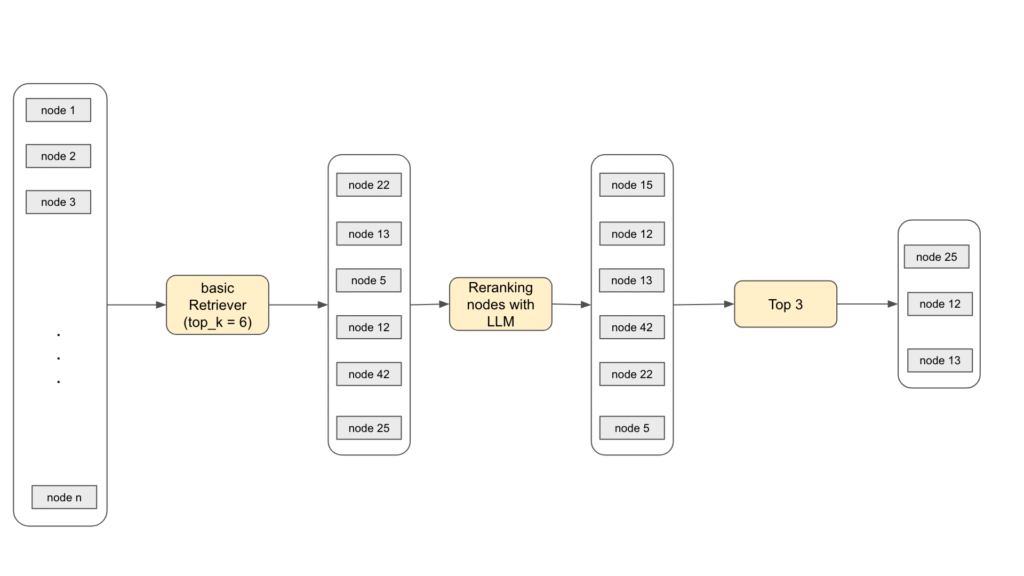
Under the hood, here’s the prompt we send to the LLM to score the relevance of each node returned by the retriever:
DEFAULT_CHOICE_SELECT_PROMPT_TMPL = ( "A list of documents is shown below. Each document has a number next to it along " "with a summary of the document. A question is also provided. \n" "Respond with the numbers of the documents " "you should consult to answer the question, in order of relevance, as well \n" "as the relevance score. The relevance score is a number from 1-10 based on " "how relevant you think the document is to the question.\n" "Do not include any documents that are not relevant to the question. \n" "Example format: \n" "Document 1:\n<summary of document 1>\n\n" "Document 2:\n<summary of document 2>\n\n" "...\n\n" "Document 10:\n<summary of document 10>\n\n" "Question: <question>\n" "Answer:\n" "Doc: 9, Relevance: 7\n" "Doc: 3, Relevance: 4\n" "Doc: 7, Relevance: 3\n\n" "Let's try this now: \n\n" "{context_str}\n" "Question: {query_str}\n" "Answer:\n" )from llama_index.core.postprocessor.llm_rerank import LLMRerank
# define new retriever
llm_rerank = LLMRerank(top_n=2, llm=OpenAI( model="gpt-3.5-turbo", temperature=0))
retriever_with_rerank = index.as_retriever(similarity_top_k=6, node_postprocessors=[llm_rerank])
# evaluate
rerank_retriever_evaluator = RetrieverEvaluator.from_metric_names(metrics, retriever=retriever_with_rerank)
eval_results = await rerank_retriever_evaluator.aevaluate_dataset(qa_dataset)
display_results(eval_results)hit_rate: 0.95
mrr: 0.81We can clearly see the impact of reranking — but again, it comes with a cost, since we’re using an LLM call.
Usually, a small/cheap model works well enough for this step.
Conclusion
In this tutorial, we explored and evaluated a central concept of RAG: the retriever, and we saw how reranking affects its performance.