Mastering Tools with Langchain
In our previous article, we explored the foundational concept of Agents and delved into the ReAct (Reasoning + Acting) framework. We also touched upon how to define tools using the OpenAI format. Today, we’re taking a step further into the ecosystem. We will explore the vast library of tools offered by LangChain and, more importantly, learn how to build and safeguard your own custom tools to give your agents « superpowers. »
1. What Defines a Tool?
Before we start coding, we need to understand the anatomy of a tool. In the world of LLMs, a tool is more than just a function; it is an interface that the model must understand. To define a tool, three components are essential:
-
Name: A unique identifier for the tool.
-
Description: This is arguably the most critical part. The LLM relies on this text to understand what the tool does and when to invoke it. A vague or poorly written description can lead to the LLM ignoring the tool or, worse, using it incorrectly.
-
Payload Schema: The specific input parameters (arguments) required for the tool to function correctly.
2. Built-in LangChain Tools
Before you start building from scratch, it is wise to look at what the community has already built. LangChain offers a suite of « Built-in Tools » well-maintained, battle-tested utilities that allow you to reach your goals faster.
2.1 Web Search Tools
An AI agent often needs real-time data to remain relevant. LangChain supports several search engines like Bing, Google, and Tavily. While these usually require an API key, there is a « hidden gem » for quick prototyping: DuckDuckGo Search. It allows you to perform web searches with zero configuration—it just works like magic, we will see it later in action.
2.2 Enhancing LLM Knowledge
Sometimes, general training data isn’t enough. You can bridge the gap using specific knowledge tools:
-
Arxiv: Perfect for answering complex questions about Physics, Mathematics, Computer Science, and more by pulling from scientific papers.
-
WikipediaQueryRun: A wrapper for Wikipedia to answer general questions about history, people, companies, and facts.
-
YahooFinanceNewsTool: Essential for financial analysis. It provides the latest news on public companies using their stock tickers (e.g., AAPL, MSFT).
-
OpenWeatherMap: Provides real-time weather data for any specific location.
-
Wolfram Alpha: A powerhouse for computational logic, helping agents solve complex math, science, and technology queries.
2.3 Productivity Tools
LangChain also includes tools to help with daily tasks. For example, the GmailToolkit allows your agent to interact with your inbox, enabling actions like GmailCreateDraft or GmailSendMessage.
3. Custom tools
The most flexible way to extend your agent is by turning any Python function into a tool. By simply using the @tool decorator, LangChain automatically maps your code:
-
The Function Name becomes the tool name.
-
The Docstring becomes the tool description.
-
The Function Parameters define the tool’s input schema
Let’s see one example:
mport math
from langchain_core.tools import tool

@tool
def calculate_logarithme(val: float):
  """
  Calculates the logarithm of a given value.
  """

  return math.log(val)

print("tool name: ", calculate_logarithme.name)
print("tool description: ", calculate_logarithme.description)
print("tool args schema: ", calculate_logarithme.args_schema.model_json_schema())tool name: calculate_logarithme
tool description: Calculates the logarithm of a given value.
tool args schema: {'description': 'Calculates the logarithm of a given value.', 'properties': {'val': {'title': 'Val', 'type': 'number'}}, 'required': ['val'], 'title': 'calculate_logarithme', 'type': 'object'}If you have complex arguments for your function, you can use Pydantic; LangChain handles it brilliantly. Here is this example.
from typing import Optional
from langchain_core.tools import tool
from pydantic import BaseModel, Field

class RideInputs(BaseModel):
  distance: float = Field(description="The distance of the ride")
  time: int = Field(description="The time in minutes")
  passengers_count: Optional[int] = Field(description="The number of passengers")

@tool
def calculate_fare(inputs: RideInputs) -> float:
  """
  Calculates the fare of a ride.
  """
  pass

print("tool name: ", calculate_fare.name)
print("tool description: ", calculate_fare.description)
print("tool args schema: ", calculate_fare.args_schema.model_json_schema())tool name: calculate_fare
tool description: Calculates the fare of a ride.
tool args schema: {'$defs': {'RideInputs': {'properties': {'distance': {'description': 'The distance of the ride', 'title': 'Distance', 'type': 'number'}, 'time': {'title': 'Time', 'type': 'integer'}, 'passengers_count': {'anyOf': [{'type': 'integer'}, {'type': 'null'}], 'title': 'Passengers Count'}}, 'required': ['distance', 'time', 'passengers_count'], 'title': 'RideInputs', 'type': 'object'}}, 'description': 'Calculates the fare of a ride.', 'properties': {'inputs': {'$ref': '#/$defs/RideInputs'}}, 'required': ['inputs'], 'title': 'calculate_fare', 'type': 'object'}4. Hands-on Example: The Inflation Agent
Let’s put this into practice by building a ReAct agent similar to the one in our last post. Our goal: Find the US inflation rate for December 2025 and calculate its logarithm.
By combining a search tool (to find the rate) and a custom mathematical tool (to calculate the log), what used to be a complex coding task becomes a streamlined workflow.
from langchain.agents import create_agent
from langchain_community.tools import DuckDuckGoSearchRun

search_tool = DuckDuckGoSearchRun()
tools = [calculate_logarithme, search_tool]

agent = create_agent("gpt-5", tools=tools, system_prompt="Your mission is to answer the user's question very concisely.")Let’s check the structure of our react agent
from IPython.display import Image, display
from langchain_core.runnables.graph import CurveStyle, MermaidDrawMethod, NodeStyles

display(Image(agent.get_graph().draw_mermaid_png()))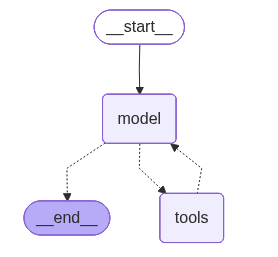
The agent reasons that it needs the web for the data and the math tool for the calculation, executing them in sequence.
for event in agent.stream({"messages": [("user", "What is the logarithme of the inflation rate in novembre 2025 in USA ?")]}, stream_mode="values"):
event["messages"][-1].pretty_print()============ Human Message ============
What is the logarithme of the inflation rate in novembre 2025 in USA ?
============ Ai Message ============
Tool Calls:
duckduckgo_search (call_GYepAekmuFEo1Yd7cmthLES0)
Call ID: call_GYepAekmuFEo1Yd7cmthLES0
Args:
query: US inflation rate November 2025 CPI YoY
============ Tool Message ============
Name: duckduckgo_search
Dec 18, 2025 · The consumer price index rose at a 2.7% annualized rate last month, a delayed report from the Bureau of Labor Statistics showed. Economists polled by Dow Jones expected the CPI to have risen 3.1% ... In November , the Consumer Price Index for All Urban Consumers rose 2.7 percent over the last 12 months, not seasonally adjusted. The index for all items less food and energy increased 2.6 percent over the year (NSA). December 2025 CPI data are scheduled to be released on January 13, 2026, at 8:30 A.M. Eastern Time. read more » Dec 18, 2025 · Inflation Unexpectedly Slowed to 2.7% in November The latest Consumer Price Index was below what economists had expected and likely reflects what they called distortions caused by the government ... Dec 18, 2025 · The CPI was expected to rise 3% on an annual basis last month, according to economists surveyed by financial data firm FactSet. In the most recent inflation reading, from September, the CPI rate ... Dec 18, 2025 · The CPI rose 2.7% over the 12 months to November , while the core was up 2.6% - the lowest reading since inflation began soaring back in March 2021.
============ Ai Message ============
Tool Calls:
calculate_logarithme (call_Ha0JZ52UEaEpUF81xcx1lubY)
Call ID: call_Ha0JZ52UEaEpUF81xcx1lubY
Args:
val: 0.027
calculate_logarithme (call_2bDs1BdZvcdVEcgrEiwc6DN9)
Call ID: call_2bDs1BdZvcdVEcgrEiwc6DN9
Args:
val: 1.027
calculate_logarithme (call_vjH38oKl5MMwcGqiOZGC5fDv)
Call ID: call_vjH38oKl5MMwcGqiOZGC5fDv
Args:
val: 10
============ Tool Message ============
Name: calculate_logarithme
2.302585092994046
============ Ai Message ============
- U.S. CPI inflation (YoY), November 2025: 2.7%.
- If you want ln(1 + inflation): ln(1.027) ≈ 0.02664.
- If you literally want ln(inflation as a decimal): ln(0.027) ≈ -3.6119.
Tell me which definition you need (economists usually use ln(1 + rate)).5. Handling Errors Gracefully
When developing agents, error management is not an option: it’s a necessity. Tools can fail, and how your agent responds determines its reliability. LangChain helps us manage two main types of errors:
-
Validation Errors: Occur when the LLM passes the bad arguments to a tool.
-
Runtime Errors: Occur when the tool itself crashes during execution (e.g., a network failure or a logic bug).
Let’s modify our « calculate_logarithm » tool to intentionally fail: we will divide any input value by zero. When we invoke the tool, it gives the following error:
{'model': {'messages': [AIMessage(content='', additional_kwargs={'refusal': None},
...
...
...
/tmp/ipython-input-723224319.py in calculate_logarithme(val)
      8   Calculates the logarithm of a given value.
      9   """
---> 10   return math.log(val/0)
     11
     12 from langchain.agents import create_agent

ZeroDivisionError: float division by zero
Let’s take a look under the hood: The Tool-type node includes a parameter called handle_tool_errors. This parameter is injected as a flag to the following function to handle errors. Here’s a screenshot from langchain’s code:
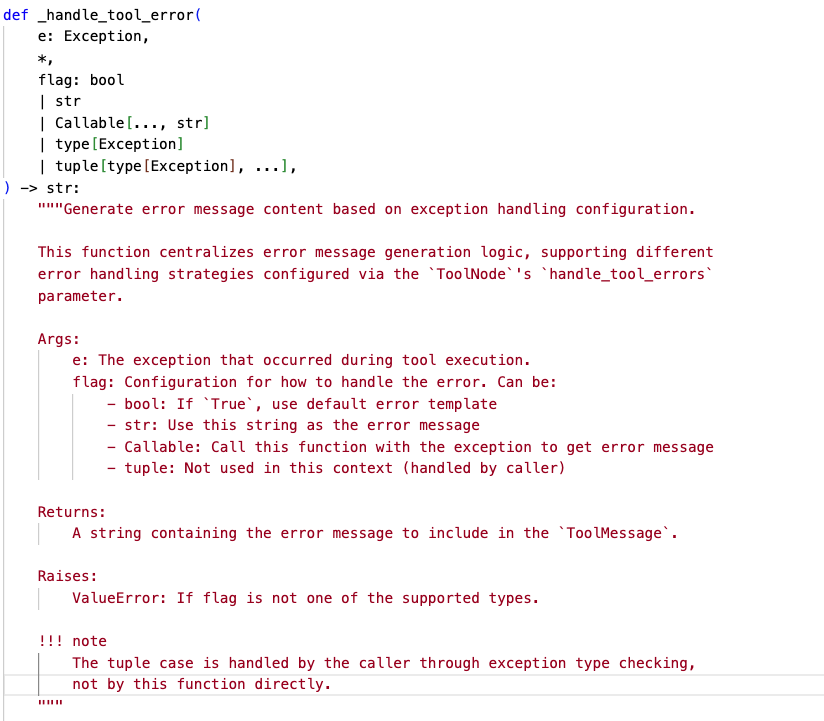
If this parameter is not specified during the definition of the tool node, it is defined by default as this Callable:
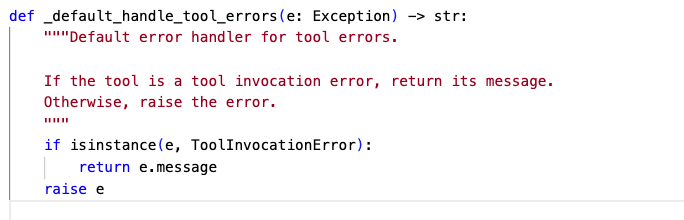
That’s why if you do nothing for errors handling, only exceptions of type ToolInvocationError will be handled.
To change this behavior, we will edit the node indirectly and change the flag to add a generic string for all type of errors (This is not really a good practice, it is only for the sake of test to let you see the difference)
agent.nodes["tools"].bound._handle_tool_errors = "an error has occurred during tool call"{'model': {'messages': [AIMessage(content='', additional_kwargs={'refusal': None})]}}
========
{'model': {'messages': [AIMessage(content='', additional_kwargs={'refusal': None})]}}
========
{'tools': {'messages': [ToolMessage(content='an error has occurred during tool call', name='calculate_logarithme', id='de32eb66-f947-4ba4-bb9e-bbd702968b1c', tool_call_id='call_a9XnCUvujKyBPk2bOrTUVDPd', status='error')]}}
========
{'model': {'messages': [AIMessage(content='- US CPI inflation (YoY) in November 2025: about 2.7% (BLS).\n- Natural log of the rate (ln 0.027): −3.6119\n- Base-10 log (log10 0.027): −1.5686\n- If you meant ln(1 + inflation): ln(1.027) = 0.0266', additional_kwargs={'refusal': None}}Bingo! We can see that the LLM identified the error and decided to calculate the result using its own internal logic instead.
When building agents in production, handling errors is essential for the success of you application. Here is my tips for this:
- Errors must never be silent (like any other software application)
- Small tools are better: Make tools as small as possible with a defined perimeter will help you to localise and handle better your errors
- Make a retry only if it makes sens: Choose wisely when to make retries, otherwise, your agent will lose time retrying for no benefits. For exemple, If you get 5xx http code when calling an external API, it makes sens to retry, but that’s not the case when you get 4xx errors.
- Catch the known errors and tell the llm how to handle them (for example tell the llm to use its own logic or some other tool)
Conclusion:
We’ve seen that building robust agents requires more than just a good prompt; it requires a well-curated toolbox. From using « plug-and-play » tools like DuckDuckGo to wrapping your own Python logic with the @tool decorator, the possibilities are endless. Most importantly, we’ve learned that error handling is the secret ingredient to building reliable agents that can recover from failure.