A Guide to Hybrid Retrieval and BM25
Introduction
In our previous articles, we talked about the concept of RAG and explored how HNSW (the algorithm behind semantic search) works.
Semantic search is very powerful: Most of the time, it helps us find relevant documents that match the user’s intent. However, it has its limits: Imagine you work in a niche field and use your own jargon (for example, using the term « TTWP » for an internal procedure), in that case, semantic search probably won’t help you much because standard embeddings won’t capture the specific meaning of your technical terms. In this case, we need to go back to basics: old-school lexical search. The whole idea of Hybrid RAG is to combine both methods to find the most relevant documents.
In this article, we will:
- Explain how Hybrid RAG works.
- Code a Hybrid RAG using a practical example.
- Explain and prototype the main algorithm behind lexical search: BM25.
1. How Hybrid RAG works
As explained in the introduction, Hybrid retrieval combines two retrieval methods in parallel, and the results are fused to leverage the strengths of both approaches:
- Dense retrieval: Uses vector embeddings for semantic understanding.
- Sparse retrieval: Employs lexical methods like BM25 for keyword precision.
The workflow is as follows:
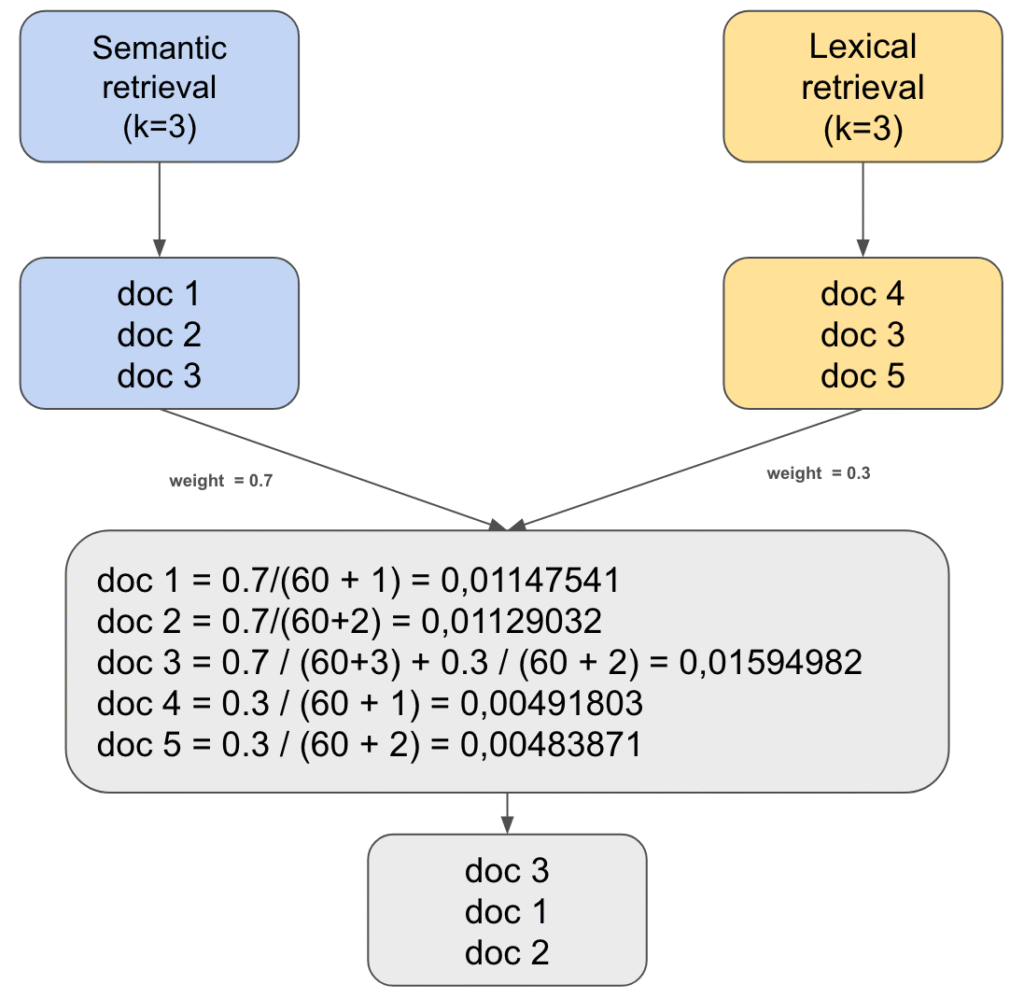
- Find the n relevant documents using a semantic retriever.
- Find the n relevant documents using a lexical retriever.
- Assign a weight to each method (for example, alpha and 1 – alpha). We usually recommend giving more weight to semantic search since it remains our foundation.
- Reciprocal Rank Fusion (RRF): We fusion returned documents by both methods. For every document returned by either method, we calculate a score. If a document appears in both lists, we sum its two scores after multiplying each score by the corresponding weight. We then take the k documents with highest scores. We use this formula to compute that score
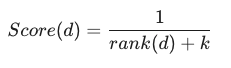
- rank(d) : This is the position of the document in the ranking returned by the retirver (1 for the first, 2 for the second, etc.)
- k: The smoothing constant. In most standard implementations (such as Microsoft Azure or Elasticsearch), this value is set to 60 by default.
Here is a concrete example:
2. Example
Enough talking, let’s move to a concrete example! We are going to code this out. You can find and play with the code in the Google Colab notebook.
As mentioned before, we will use a niche domain with specific jargon. I’ve chosen a document detailing the Local Urbanism Plan (PLU) of Paris (sorry for international readers, the source is in French).
We will ask a very technical question: « Quels sont les objectifs assignés à la zone UGSU?« If everything works correctly, we should find the exact part of the document mentioning this:
(Note: UGSU stands for « Urbaine de Grands Services Urbains »).
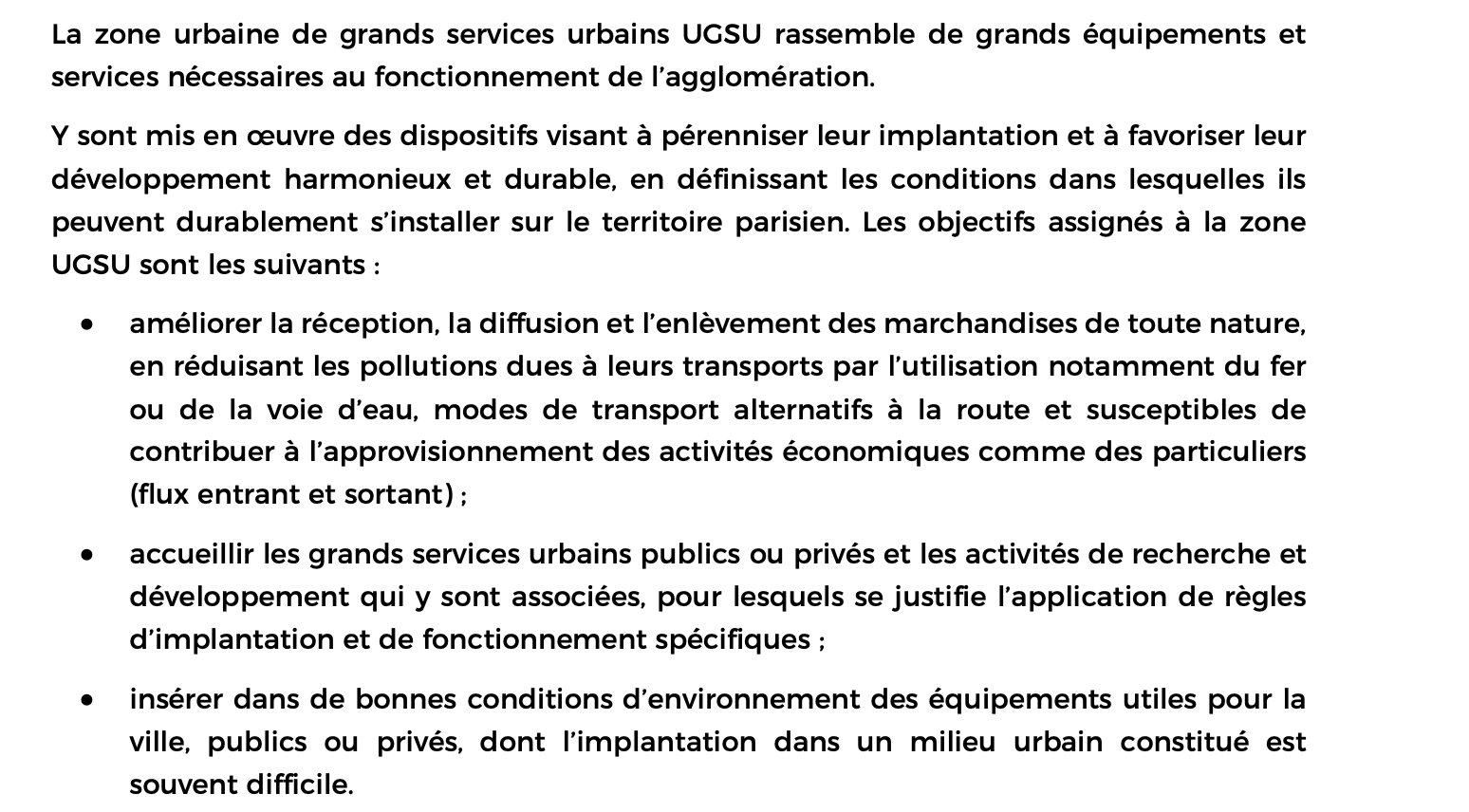
Note: UGSU stands for « Urbaine de Grands Services Urbains »
Step 1: We read the document and split it into several chunks.
from langchain_community.document_loaders import PyPDFLoader
from langchain_core.documents import Document
from langchain_text_splitters import RecursiveCharacterTextSplitter
import hashlib

file_path = "./sample_data/75056_reglement_20241120.pdf"
loader = PyPDFLoader(file_path)
pdf_doc = loader.load()

text_splitter = RecursiveCharacterTextSplitter(chunk_size=2000, chunk_overlap=0)
chunks = text_splitter.split_documents(pdf_doc)Step 2: Set up the semantic retriever
import os

os.environ["OPENAI_API_KEY"] = "<YOUR_OPENAI_API_KEY>"

from langchain_core.vectorstores import InMemoryVectorStore
from langchain_openai import OpenAIEmbeddings

# Setup semantic retriever
embeddings = OpenAIEmbeddings(
    model="text-embedding-3-small"
)
vector_store = InMemoryVectorStore(embeddings)
vector_store.add_documents(chunks)
semantic_retriever = vector_store.as_retriever(search_kwargs={"k": 5})
Step 3: Set up the lexical retriever
from langchain_community.retrievers import BM25Retriever

bm25_retriever = BM25Retriever.from_documents(chunks)
bm25_retriever.k = 5Step 4: We finally have our hybrid retriever
from langchain_classic.retrievers import EnsembleRetriever

# Hybrid retrievers (weights = 0.6 for semantic retriever and 0.4 for lexical retriever)
hybrid_retriever = EnsembleRetriever(
    retrievers=[semantic_retriever, bm25_retriever],
    weights=[0.6, 0.4]
)Now, let’s try asking our question to the retriever.
query = "Les objectifs assignés à la zone UGSU"
hybrid_results = hybrid_retriever.invoke(input=query)[:3]
is_good_document_retrieved(hybrid_results)>> 🎉 The good document IS retrieved :)Good news! It successfully finds the right answer.
If we ask the same question to our semantic retriever alone:
semantic_search_results = vector_retriever.invoke(input = query)[:3]
is_good_document_retrieved(semantic_search_results)>> 😔 The good document IS NOT retrieved :( As you can see, the semantic retriever unfortunately fails to find the correct document on its own.
3. Explain and demystify BM25:
Behind lexical search, there is a powerful algorithm that makes it all possible: BM25. In this section, we will explain it and build a prototype.
The general idea of BM25 is simple: find documents that contain the most words from the query. However, it uses a few clever nuances to make it effective. Let’s see step by step how this algorithm work. For each step, we will see both the idea and the code. We will be testing this algorithm on our example data.
Step 1: Tokenize every document and the user query.
tokenized_corpus = [doc.page_content.lower().split() for doc in chunks]
tokenized_query = query.lower().split()Step 2: For each token, every time it appears in a document, we record that document’s index. This allows us to see the frequency of each token and how many documents contain it.
from collections import defaultdict

def get_documents_per_token():
  """
  "Each time" a token appears in a documents, we add the document to the list of documents for this token.
  For example: of token t appears two times in doc_1, and one time in doc_2
  >> documents_per_token[t] = [1, 1, 2]
  """

  documents_per_token = defaultdict(list)

  for i, doc in enumerate(tokenized_corpus):
    for token in set(doc):
      documents_per_token[token].append(i)
  return documents_per_token

documents_per_token = get_documents_per_token()Step 3: Calculate the IDF (Inverse Document Frequency) for each word in the query: We give more importance to rare words. Common words like « the » or « is » (or « de », « la » in French) are found in almost every document, so they aren’t very helpful for search => They will have a small IDF. Here is the formula used:
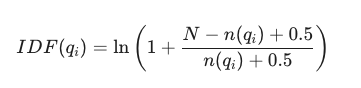
- N (Total Number of Documents): The total count of documents in the entire collection or corpus. It represents the scale of your database.
- n(q_i) (Document Frequency): The number of documents that contain the specific term q_i. It measures how common or rare a word is across the corpus.
- 0.5 (Smoothing Constant): A constant added to both the numerator and denominator to avoid division by zero and to prevent negative IDF values for very frequent terms.
- ln (Natural Logarithm): Used to dampen the effect of the ratio, ensuring that the IDF weight doesn’t grow too aggressively as a word becomes rarer.
import math
def compute_idf():
"""
compute idf for each token of the query
"""
documents_count = len(tokenized_corpus)
idf = dict()
for word in tokenized_query:
if word in documents_per_token:
number_of_docs_with_word = len(documents_per_token[word])
idf[word] = math.log(1 + (documents_count - number_of_docs_with_word + 0.5) / (number_of_docs_with_word + 0.5))
else:
idf[word] = 0
return idf
idf = compute_idf()Let’s see the IDF score of some common and uncommon words
# "la" is a common word
print(idf["la"])
# "assignés" is not a common word and it is present in our query
print(idf["assignés"])
# idf("la") will be much smaller that idf("assignés")>> 0.11324038898448764
>> 5.71042701737487Step 4: Calculate the final score for each document using the following formula.

- f(q_i, D) : The frequency of appearance of token q_i in document D.
- |D| : The number of tokens in document.
- avgdl : The average number of tokens per document
- IDF(q_i): The inverse document frequency of token q_i
b and k1 are hyper-parameters:
- b controls the length normalization of the documents. It compensates for the fact that longer documents naturally contain more words (and thus have a higher probability of containing the query terms by chance).
- k_1 controls the saturation of the term frequency f. It determines how much the repetition of a word in a document contributes to the final score. BM25 uses k_1 to « cap » the influence of a single word.
from collections import defaultdict

def get_documents_per_token():
  """
  "Each time" a token appears in a documents, we add the document to the list of documents for this token.
  For example: of token t appears two times in doc_1, and one time in doc_2
  >> documents_per_token[t] = [1, 1, 2]
  """

  documents_per_token = defaultdict(list)

  for i, doc in enumerate(tokenized_corpus):
    for token in set(doc):
      documents_per_token[token].append(i)
  return documents_per_token

documents_per_token = get_documents_per_token()Now, let’s test our algorithm on our example:
#let's check if the resut exists in three first documents
returned_docs = [chunks[i] for i, _ in scores[:3]]
is_good_document_retrieved(returned_docs)>> 🎉 The good document IS retrieved :)Conclusion:
As we’ve seen, semantic search is amazing, but it isn’t a magic wand—especially when dealing with niche jargon or specific technical terms. By combining the « intelligence » of embeddings with the « precision » of BM25, we create a Hybrid RAG that offers the best of both worlds.
Whether you are building a tool for urban planning or a private assistant for your company’s internal documents, Hybrid retrieval is often the secret ingredient to moving from a « good » system to a « reliable » one.
The next time your RAG fails to find a document because of a specific acronym, remember: sometimes, a simple keyword search is exactly what you need!