Building a Plan-and-Solve AI Agent with LangGraph
Introduction
So far, we have explored several important concepts related to AI agents:
- What an agent is
- ReAct agents
- The notion of tools and tool usage
In this article, we will not focus on theory. Instead, this is a hands-on tutorial aimed at practicing agent development while introducing a few new ideas:
-
Using LangGraph graphs (yes, every agent is essentially a graph)
-
Asking a Large Language Model (LLM) to produce structured outputs
The goal is to build an agent that mimics how the human brain approaches complex problems. When we are asked to solve something difficult, we rarely try to solve it in one shot. Instead, we decompose the problem into smaller sub-problems and solve them step by step.
For example, when writing an article, the first thing to do is to define its structure (introduction, sections, conclusion, etc.). Then, we work on each section independently. This approach is known as Plan-and-Solve, and it is particularly well suited for LLMs.
Experiments have shown that LLMs tend to produce higher-quality answers when prompts are smaller, more precise, and well-scoped. Giving a large, complex, and poorly defined problem to an LLM significantly reduces the probability of obtaining a good answer. Plan-and-Solve agents address this issue by introducing explicit planning and incremental reasoning.
What Is a Plan-and-Solve Agent?
A Plan-and-Solve agent follows a simple but powerful workflow:
-
The agent receives a user question.
-
The agent generates a plan, composed of multiple ordered steps.
-
The agent executes each step sequentially.
-
After each step, the result is stored and reused to generate a final output.
This explicit decomposition allows the agent to reason more reliably and to reuse intermediate results in a controlled manner.
Why LangGraph?
To orchestrate this workflow, we will use LangGraph. Under the hood, every LangChain agent is essentially a compiled cyclic graph. LangGraph makes this explicit and gives us fine-grained control over agent execution. A LangGraph-based agent is composed of three main elements:
- State: The state is a
TypedDictthat stores all the information required for the agent to function. It represents the agent’s memory at any point in time. - Nodes: Each node is a Python function:
-
It receives a copy of the current state as input
-
It returns a dictionary containing updates for that state
-
LangGraph automatically merges these updates into the global state.
-
- Edges: define how the agent transitions from one node to another. There are two types of edges:
-
Simple edges: define a fixed transition.
-
Conditional edges: allow the agent to choose the next node based on a condition.
-
Together, these elements form a graph that represents the full lifecycle of the agent. Below is an approximate diagram of the graph we are going to build.
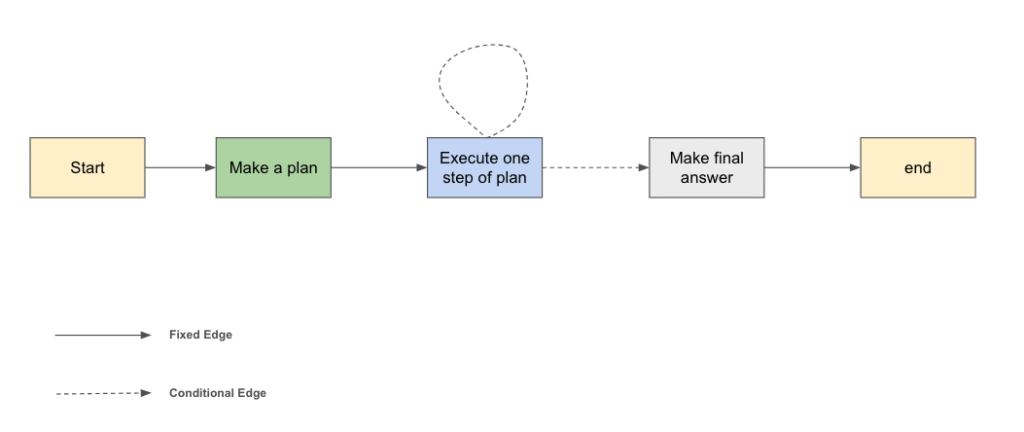
Now that the high-level picture is clear, let’s stop talking and start building our agent.
1. Defining the Agent State
At any moment, the agent must be able to access or decide the following information at any time:
-
The user’s original question
-
The generated plan (a list of steps)
-
The results of the steps that have already been executed
- The final answer
from typing import List, TypedDict, Annotated
from pydantic import BaseModel, Field
from langgraph.graph.state import StateGraph
from langchain_core.prompts import ChatPromptTemplate
from langchain_openai import ChatOpenAI
from langchain_core.messages import HumanMessage, SystemMessage
from langchain_community.tools import DuckDuckGoSearchRun

from pydantic import BaseModel
import operator


class Plan(BaseModel):
    steps: List[str] = Field("The ordered steps of the plan")

    def __str__(self) -> str:
      steps_str = [f"{i+1}: {step}" for i, step in enumerate(self.steps)]
      return "\n".join(steps_str)

class PlanState(TypedDict):
  task: str
  plan: Plan
  result_by_step: Annotated[list[str], operator.add]
  final_answer: str


# Build an empty graph
graph_builder = StateGraph(PlanState)* In the field, we add the operator `add` so that langraph adds the result found for each step to the list of results and not update it (that would result in erasing the previous results)
This information will be stored in the agent’s state and updated incrementally as the graph executes.
2. Build Nodes:
2.1 The “Find Plan” Node
The first node of our graph is responsible for generating a plan. In this node, we ask the LLM to produce a structured plan. Modern LLMs support structured outputs by enforcing a JSON schema. In LangChain, this can be achieved using Pydantic models together with the with_structured_outputs method.
The output of this node is a well-defined plan that the rest of the agent can reliably consume.
def find_plan(plan: PlanState) -> Plan:
  system_message = """You are a language model specialized in analysis and planning.

  Before responding:
  - Break the task down into sub-goals.
  - Identify dependencies, constraints, and potential risks.
  - Reason methodically to determine the most effective approach.

  Then:
  - Provide a detailed, ordered execution plan.
  - Ensure each step is clear, justified, and actionable.
  """
  prompt = ChatPromptTemplate(
      [
          ("system", system_message),
          ("human", "Please give a plan for the following task: {Task}")
      ]
  )

  llm = ChatOpenAI(model="gpt-4o", temperature=0).with_structured_output(Plan)

  chain = prompt | llm

  plan = chain.invoke({"Task": f"{plan["task"]}"})
  return {"plan": plan}

# add this node to graph builder
graph_builder.add_node("plan", find_plan)Before moving on, it is a good idea to test this node independently to ensure that the generated plans are consistent and usable.
task = "write a post about plan-and-solve ai agents.Please try to be concise and produce some code snippets as examples"
res = find_plan({"task": task})
print(res["plan"])1. **Research and Understand Plan-and-Solve AI Agents**: Gather information on what plan-and-solve AI agents are ...
2. **Identify Key Components and Concepts**: Break down the plan-and-solve approach into its core components, such as plannin...
3. **Outline the Post Structure**: Create an outline for ..
4. **Draft the Introduction**: Write an engaging introduction that explains the importance of plan-and-solve AI agents and sets the context for the discussion.
5. **Explain the Concept**: In the main body, describe what plan-and-solve AI agents are, how they work ...
6. **Provide Code Snippets**: Develop simple code snippets that illustrate the basic principles of plan-and-solve agents...
7. **Discuss Applications and Examples**: Highlight real-world applications of plan-and-solve AI agents, such as in robotics ...
8. **Conclude the Post**: Summarize the key points discussed and emphasize the potential of plan-and-solve AI agents in various fields.
9. **Review and Edit**: Proofread the post for clarity, coherence, and technical accuracy...
10. **Publish and Share**: Once satisfied with the content, publish the post on ..2.2 The “Execute One Step” Node
To execute each step of the plan, we rely on a ReAct-style agent.
This execution agent is equipped with classic tools such as Wikipedia arXiv, and duckduck web search. For each execution:
-
We provide the original plan
-
The list of all steps
-
The current step
-
[Optional] The results of previously executed steps (I didn’t add the previous step’s results in order to optimize my tokens)
In order to use those tools, we have invoked inside this node a react agent which is explicitly instructed to focus only on the current step and return a result relevant to that step alone. This isolation is critical to avoid prompt bloat and to keep reasoning precise.
from langchain_community.agent_toolkits.load_tools import load_tools
from langchain.agents import create_agent

system_execution_prompt = """
  You are an execution-focused assistant.

  You will be provided with:
  - The overall task or objective
  - The full execution plan
  - One specific step from that plan to execute

  Your role is to execute only the given step, in alignment with the overall task and plan.

  When executing the step:
  1. Understand the purpose of this step within the broader plan.
  2. Use only the information, assumptions, and constraints relevant to this step.
  3. Do not modify or re-plan other steps unless explicitly instructed.
  4. If the step depends on missing or unclear information, clearly state what is needed.
  5. Produce a concrete, actionable output that completes this step.

  Stay focused on the assigned step.
  Do not execute future steps or revisit completed ones.
  """
one_step_exeuction_agent = create_agent(
    "gpt-5",
    tools=load_tools(["arxiv", "wikipedia", "ddg-search"]),
    system_prompt=system_execution_prompt)


def execute_one_step(state: PlanState) -> PlanState:

  current_step_index = len(state["result_by_step"])
  current_step = state["plan"].steps[current_step_index]
  task = state["task"]
  user_message = f"""Task: {task} \n ======= \n Full plan: {state["plan"]} \n ======= \n Current step: {current_step}"""
  result = one_step_exeuction_agent.invoke({"messages": [("user", user_message)]})
  step_result = result["messages"][-1].content
  return {"result_by_step": [step_result]}

# add this node to graph builder
graph_builder.add_node("execute_step", execute_one_step)
2.3 The “Final Answer” Node
Once all steps have been executed, the agent reaches the final node. At this stage, we provide the LLM with:
- The original task
- The full plan
- The result of each step
The LLM is then asked to synthesize all this information into a final and coherent answer.
def prepare_the_final_answer(state: PlanState) -> str:
  system_prompt = """
  You are a synthesis and integration assistant.

  You will be provided with:
  - A task (the overall objective)
  - An execution plan composed of multiple steps
  - The output or result produced for each step of the plan

  Your role is to produce the final result for the task by integrating the step results.
  """


  human_message = "task: {Task} \n Plan and outputs for each step: {outputs_by_step}"
  prompt = ChatPromptTemplate(
      [
          ("system", system_prompt),
          ("human", human_message)
      ]
  )

  llm = ChatOpenAI(model="gpt-4o", temperature=0)
  chain = prompt | llm
  outputs_by_step = "===".join([f"Step {i+1}: {step} \n >> Step Result: {state["result_by_step"][i]}" for i, step in enumerate(state["plan"].steps)])
  result = chain.invoke({"Task": state["task"], "outputs_by_step": outputs_by_step})
  return {"final_answer": result}

# add this node to graph builder
graph_builder.add_node("final_answer", prepare_the_final_answer)3. Build Edges:
To build edges, we will start by static ones:
graph_builder.add_edge(START, "plan")
graph_builder.add_edge("plan", "execute_step")
graph_builder.add_edge("final_answer", END)Now , we will build the conditional edge: When we are in the execute step: if there are any other steps to execute, we go back to execute_step node, else we prepare the final answer and end the process.
from typing import Literal

def should_give_final_answer(state: PlanState) -> Literal["execute_step", "final_answer"]:

    if len(state["result_by_step"]) == len(state["plan"].steps):
        return "final_answer"
    return "execute_step"


graph_builder.add_conditional_edges("execute_step", should_give_final_answer)Excellent, let’s compile our graph and take a look on it
from IPython.display import Image, display

plan_and_solve_agent = graph_builder.compile()
display(Image(plan_and_solve_agent.get_graph().draw_mermaid_png()))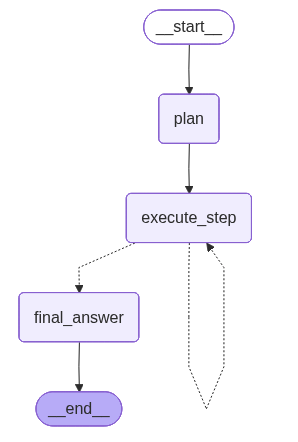
Conclusion and Experimentation
I strongly encourage you to experiment with this code and adapt it to your own use cases.
As a demonstration, I asked this Plan-and-Solve agent to write an article about Plan-and-Solve agents themselves. You can find the generated result at this link and compare it with this article.
You can also try asking a recent LLM to perform the same task in a single prompt and compare the results. In many cases, you will notice that the Plan-and-Solve approach produces more structured, coherent, and reliable outputs.
Notice that we called another agent inside this Plan-and-Solve agent: the execution of each step was handled by a ReAct-style agent with its own tools. This demonstrates how agents can be composed hierarchically to solve complex tasks in a structured manner.
In the next article, we will explore multi-agent systems where multiple specialized agents collaborate, each with its own expertise, to solve tasks more efficiently and robustly.