Fine-Tuning Sentiment Analysis for Financial Markets Using QLoRA
In this post, you will:
- understand the concept of fine-tuning and its different types
- apply QLoRA-style fine-tuning to make an LLM smarter at analyzing financial market news
You can follow all the QLoRA fine-tuning steps in this Google Colab notebook.
1. Understand Fine-Tuning
Before diving into fine-tuning, we need a quick refresher. A Large Language Model (LLM) is essentially a token generator: it takes a sequence of tokens and tries to predict the next token by performing statistical calculations based on the data it was trained on.
So if you say to an LLM: “hello it is me?”, it might reply “I was wondering if after all these years you’d like to meet” simply because it has seen Adele’s Hello during training. It doesn’t truly understand that you’re asking a question.
ChatGPT, the version we all know, was obtained by fine-tuning a GPT LLM to teach it to answer questions — meaning it was trained on a large set of question/answer pairs. This is what we call instruction fine-tuning.
Fine-tuning means retraining a general-purpose language model on targeted data to adapt its behavior or skills to a specific task.
There are several types of fine-tuning:
1.1 Full Fine-Tuning
You retrain all the model’s parameters on your specialized dataset. Since modern models have hundreds of billions of parameters, this requires massive computational resources — you basically need to be rich to do it.
1.2. LoRA (Low-Rank Adaptation)
You keep the model’s original parameters frozen, and you attach small additional matrices that allow you to adjust the model’s behavior. These are lightweight and efficient to train.
1.3. RLHF (Reinforcement Learning from Human Feedback)
RLHF consists of training a model using human preference data:
- Humans receive several answers for a single question and rank them from worst to best
- A reward model learns these preferences
- A reinforcement learning algorithm updates the LLM using the reward scores
If this still feels unclear at this stage, no worries — we’ll break it down further.
2. The Mathematical Intuition behind LORA
Inside an LLM, you have huge parameter matrices W of size (n × m). Normally, fine-tuning means adjusting W slightly: So, after fine-tuning,
W′ = W + ΔW
LoRA’s goal is to compute ΔW without modifying W itself (W stays frozen). Since ΔW is also (n × m), we decompose it like this:
ΔW = A × B
where A is (n × r) and B is (r × m), with r much smaller than min(n, m).
This way, instead of learning n × m parameters, we only learn n × r + r × m.
For example, if n = 10K, m = 20K, and r = 4, we go from 200 million parameters to just 100K.
2.1 From Lora to QLora
With a simple Lora, there’s one last constraint: memory.
Even if we freeze W, we still have to load it into memory, and that’s huge. This brings us to QLoRA, a variant of LoRA: Instead of loading W in 16-bit precision, we quantize it to 4-bit using an algorithm called NF4.
This works because the weight distribution usually follows a normal law centered at zero. The approximation barely affects results because:
- even with reduced precision, values stay close enough
- the learned ΔW will naturally compensate for small errors
If you want to find more i information about NF4 quantizing, please refer to this article.
Why I like QLoRA ?
In my opinion, QLoRA is the best fine-tuning approach because it optimizes three crucial aspects:
- Memory (the base model is quantized
- Training cost (usually a single GPU is enough)
- Prevents overfitting.
So let’s go — time to run QLoRA!
3. QLora in action:
Step 1: Choosing the Model to Optimize
Since I don’t have huge compute resources, I chose a model that is lightweight, popular, open-source, and uses a decoder-only architecture. For today’s demo, we’ll use a famous model from Alibaba: Qwen/Qwen3-0.6B. It has the following characteristics:
- Multilingual
- 600 million parameters
- 28 layers
- 24 attention heads
Hardware Choice: In order to make training fast, I’m using a standard L4 NVIDIA GPU on Google Colab. This GPU is very optimized for NF4 quantized models.
Let’s have a closer look on the model:
from torchinfo import summary

print("model device : ", model.device)
print("IsQuantized : ", model.is_loaded_in_4bit)
summary(
    model,
    depth=2,
    verbose=0
)model device : cuda:0
IsQuantized : True
===========================================================================
Layer (type:depth-idx) Param #
===========================================================================
Qwen3ForCausalLM --
├─Qwen3Model: 1-1 --
│ └─Embedding: 2-1 155,582,464
│ └─ModuleList: 2-2 220,265,472
│ └─Qwen3RMSNorm: 2-3 1,024
│ └─Qwen3RotaryEmbedding: 2-4 --
├─Linear: 1-2 155,582,464
===========================================================================
Total params: 531,431,424
Trainable params: 311,230,464
Non-trainable params: 220,200,960
===========================================================================It seems working well: we are in a cuda architecture, the model is quantized and has 531 million params
Step 2: Choosing the Dataset
Let’s say we want our model to be a solid financial advisor. We’ll use a public Hugging Face dataset: sujet-ai/Sujet-Finance-Instruct-177k
Part of the dataset focuses on sentiment analysis: the LLM must classify financial market news with one word: positive, negative, bearish, bullish, or neutral.
Here’s an example:
from datasets import load_dataset

dataset_id = "sujet-ai/Sujet-Finance-Instruct-177k"
raw_datasets = load_dataset(dataset_id)

def take_only_sentiment_analysis_task(example):
    return example["task_type"] == "sentiment_analysis"

sentiment_analysis_dataset = raw_datasets['train'].filter(take_only_sentiment_analysis_task){'Unnamed: 0': 1,
'inputs': 'You are a financial sentiment analysis expert. Your task is to analyze the sentiment expressed in the given financial text.Only reply with positive, neutral, or negative.\n\nFinancial text:\nTechnopolis plans to develop in stages an area of no less than 100,000 square meters in order to host companies working in computer technologies and telecommunications , the statement said .\n\nAnswer:',
'answer': 'neutral',
'system_prompt': 'You are a financial sentiment analysis expert. Your task is to analyze the sentiment expressed in the given financial text.Only reply with positive, neutral, or negative.',
'user_prompt': 'Technopolis plans to develop in stages an area of no less than 100,000 square meters in order to host companies working in computer technologies and telecommunications , the statement said .',
'task_type': 'sentiment_analysis',
'dataset': 'financial_phrasebank',
'index_level': None,
'conversation_id': None}Step 3: What do we Want to fix?
We noticed that the model struggles to identify neutral news — it tends to classify them as positive.
So our LLM is a bit too optimistic, and in financial markets, blind optimism can be dangerous. We’ll teach it to be more balanced.
neutral_news_indexes = [
    i
    for i in range(len(sentiment_analysis_dataset))
    if sentiment_analysis_dataset[i]["answer"] == "neutral"
]

for i in neutral_news_indexes[:10]:
  llm_sentiment = get_sentiment(sentiment_analysis_dataset, i, model, tokenizer)
  print("llm sentiment: ", llm_sentiment)
  print("real sentiment: ", sentiment_analysis_dataset[i]["answer"])
print("----------")....
----------
llm sentiment: positive
real sentiment: neutral
----------
llm sentiment: positive
real sentiment: neutral
----------
llm sentiment: positive
real sentiment: neutral
----------
llm sentiment: positive
real sentiment: neutralStep 4: Freeze the model
Like we said before, we don’t want to train the model’s parameters, but only Lora’s parameters (matrices A and B), so we will start by freezing the model’s parameters.
for param in model.parameters():
param.requires_grad = FalseStep 5: Add the LoRA layers to the model
from peft import LoraConfig, get_peft_model

lora_config = LoraConfig(
    r=8,
    lora_alpha=32,
    lora_dropout=0.05,
    task_type="CAUSAL_LM"
)
model.add_adapter(lora_config, adapter_name="lora_adapter")
summary(
    model,
    depth=2,
    verbose=0
)================================================================================
Layer (type:depth-idx) Param #
================================================================================
Qwen3ForCausalLM --
├─Qwen3Model: 1-1 --
│ └─Embedding: 2-1 (155,582,464)
│ └─ModuleList: 2-2 221,412,352
│ └─Qwen3RMSNorm: 2-3 (1,024)
│ └─Qwen3RotaryEmbedding: 2-4 --
├─Linear: 1-2 (155,582,464)
================================================================================
Total params: 532,578,304
Trainable params: 1,146,880
Non-trainable params: 531,431,424
================================================================================The number of trainable parameters is equal to ~1.1 M, that’s so light => Everything looks good ! so let’s continue !
Step 6: Fine-Tuning
Before starting fine-tuning, we need so more configuration:
- the training configuration
- the dataset mapping (for each training row, we pass the full target answer to the LLM)
- the dataset split: 80% training, 10% validation, 10% test (after fine-tuning)
from transformers import TrainingArguments
training_arguments = TrainingArguments(
    output_dir="./fine-tuned-qwen3-0.6B",
    eval_strategy="epoch",
    save_strategy="epoch",
    gradient_accumulation_steps=5,
    per_device_train_batch_size=8,
    per_device_eval_batch_size=8,
    num_train_epochs=10,
    logging_steps=5,
    learning_rate=2e-5,
    bf16=True,
    report_to="none"
)

# split dataset
split = sentiment_analysis_dataset.train_test_split(test_size=0.2, seed=42)
train_dataset = split["train"]
test_eval_dataset = split["test"].train_test_split(test_size=0.5, seed=42)
test_dataset = test_eval_dataset["train"]
eval_dataset = test_eval_dataset["test"]

def format_dataset(example):
return f"{example['inputs']} {example['answer']}"Step 7: Quantifying performance Before QLora
Before training with QLora, we first evaluate the base model on the test dataset.
The results are… disappointing (precision = ~27%). It looks like the model has very little intelligence in this specific task — hopefully QLoRA will fix that.
Step8: Start QLora training:
from trl import SFTTrainer
trainer = SFTTrainer(
    model=model,
    processing_class=tokenizer,
    train_dataset=train_dataset,
    eval_dataset=eval_dataset,
    args=training_arguments,
    formatting_func=format_dataset
)
trainer.train()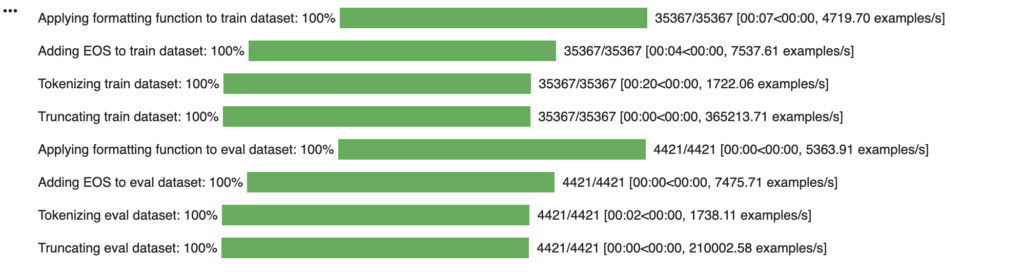
As you can see in the image above, the SFTTrainer class does quite a lot of things automatically under the hood on the train and eval datasets:
- it applies our formatting function
- adds the EOS (end of sequence) token so that the llm understands that we want to stop there.
- tokenizes and truncates each line
If you don’t want to wait for training, that’s OK, I have saved the latest checkpoint of my training and explained in the google colab notebook how to fetch and use it.
Step 9: Checking Post-Fine-Tuning Performance
When computing the precision on the test dataset of the new fine-tuned model, we have remarked that we have obtained a net increase in the performance (~58%)
Conclusion:
I hope the workflow was clear! Feel free to follow the accompanying Colab notebook and experiment with it. Fine-tuning is quite accessible, and tools like QLoRA make the whole process efficient and fun to explore.