A Beginner’s Guide to Understanding AI Agents
2025: The Year AI (Finally) Starts Working for You
If 2023 and 2024 were the years of « discovery »—where we spent our time asking ChatGPT random questions—2025 is the year of action.
The adoption of AI Agents is exploding because we’ve finally realized that generating text isn’t enough; we need to execute tasks. Today, nearly 25% of large enterprises have already integrated autonomous agents to handle customer service, logistics, or accounting. In France alone, professional use of these tools has jumped by 10% in a year, driven by a simple promise: an efficiency gain of over 60% on repetitive tasks.
We aren’t in a science-fiction movie anymore. Adopting an AI agent today isn’t just about following a trend—it’s about choosing to delegate complexity so you can focus on what actually matters.
Understanding AI Agents (For Non-Techies)
Imagine you want to renovate your house. Having a crystal-clear plan of what to do and in what order is great, but it’s not enough. Why?
-
You might not have the right tools (a jackhammer, a drill, …).
-
Your plan might hit a snag when it meets reality: things change during execution (missing materials, an unexpected defect, …).

This is exactly the difference between a Large Language Model (LLM) and an AI Agent. LLMs are text, image, or video generators. They can reason and give you a plan, but they cannot act on the real world. For example, they don’t call APIs or send emails on their own…
That is where Agents come in. They « leverage » the LLM to execute real-world actions. They do this by relying on a central concept: Tools.
To understand how we bring these agents to life, we’ll explore:
-
Tool Calling with LangChain.
-
The ReAct method, which allows LLMs to use external tools to interact with the world and become significantly more powerful.
You can play by yourself with the code through this google colab notebook.
LangChain: The Backbone of Your Agents
To show you some code snippets, I’m using the LangChain library. If AI models (like GPT-4) are the « brain, » LangChain is the nervous system that allows them to move and act.
Without this library, every developer would have to reinvent the wheel just to connect an AI to a database, the internet, or a calculator. LangChain makes these connections fluid and standardized. It provides a robust framework to « chain » the AI’s thoughts and allow it to execute complex actions reliably. It’s the go-to tool today because it transforms a simple text generator into a functional system capable of running a project from A to Z.
What Exactly Is a « Tool »?
AI models are brilliant, but they have two major weaknesses: they don’t know about recent events and they are sometimes terrible at precise math. Fortunately, because they can reason, we can give them tools (like a search engine or a calculator).
When an AI uses a tool, it follows three steps:
-
Choose the right tool (e.g., « I need the Google Search tool »).
-
Prepare the request (e.g., « Search for the US inflation rate in November 2025 »).
-
Respond by combining its internal knowledge with what the tool returned.
Let’s look at this example: we will make a simple prompt where we ask a question about recent inflation data and tell the llm that it has access to a search engine.
import os
from langchain_core.prompts import PromptTemplate
from langchain_openai import ChatOpenAI


os.environ["OPENAI_API_KEY"] = "<YOUR_OPENAI_API_KEY>"
llm = ChatOpenAI(
    model="gpt-4o-mini-2024-07-18",
    temperature=0
)

question = "What is the value of inflation in usa in November 2025 ?"
raw_prompt_template = (
  "You have access to search engine that provides you an "
  "information about fresh events and news given the query. "
  "Given the question, decide whether you need an additional "
  "information from the search engine (reply with 'SEARCH: "
   "<generated query>' or you know enough to answer the user "
   "then reply with 'RESPONSE <final response>').\n"
   "Now, act to answer a user question:\n{QUESTION}"
)
prompt_template = PromptTemplate.from_template(raw_prompt_template)
result = (prompt_template | llm).invoke(question)
print(result.content)>> SEARCH: "USA inflation rate November 2025"
We see that the llm, when he knows that there are some tools which can help him answering, chose to use it. In this example, he replied with SEARCH (like we asked him in the prompt).
Perfect, we’re gradually getting closer to understanding how the LLM interacts with tools.
OpenAPI Format
In the example above, we added the information about the tool into the prompt, but this is not sustainable because:
-
Managing (add, delete, edit) a big number of tools becomes impossible.
-
The LLM doesn’t know the parameters, names, or full descriptions of those tools.
This is solved by the OpenAPI format. It’s like the « rules of the road » that allow LangChain to move information between you, the AI, and the tools without any « accidents » in understanding. Using this format, the LLM understands—without a specific prompt—that a tool exists, how to use it, and what arguments to provide.
Let’s now define our search tool using this format and pass this information to the llm with the tools parameter and re-ask the same question:
search_tool_description = {
"type": "function",
    "function": {
        "name": "google_search",
        "description": "Returns about common facts, fresh events and news from Google Search engine based on a query.",
        "parameters": {
            "type": "object",
            "properties": {
                "query": {
                    "type": "string",
                    "title": "search_query",
                    "description": "Search query to be sent to the search engine"
                }
            },
            "required": ["query"]
        }
    }
}

first_call_result = llm.invoke(question, tools=[search_tool_description])

print(first_call_result.tool_calls)>> [{'name': 'google_search', 'args': {'query': 'USA inflation rate November 2025'}, 'id': 'call_DgxwE2r1moXMgxLVhvv6YC4z', 'type': 'tool_call'}]
This time, the llm’s answer is more structured: it has asked us to execute the tool with some arguments.
Now, let’s suppose that we have executed this tool and that it returned some result (e.g., « The inflation rate in the USA in Nov 2025 is 2.9% »), we can now pass the result to the llm using a special message: The Tool Message. It is a special message that indicates to the llm that we are responding to his desire (With the tool message, we also give the llm all the previous messages because the llm doesn’t have a memory)
from langchain.messages import ToolMessage, HumanMessage

tool_message = ToolMessage(
    content="The inflation rate in USA in november 2025 is equal to 2.9%",
    tool="google_search",
    tool_call_id=first_call_result.tool_calls[0]["id"]
)

second_call_result = llm.invoke(
    [HumanMessage(question), first_call_result, tool_message],
    tools=[search_tool_description]
)
print(second_call_result.content)>> The inflation rate in the USA in November 2025 is 2.9%.
Bingo! Now the LLM has the facts it needs to give the right answer.
The ReAct Agent: Reasoning + Acting
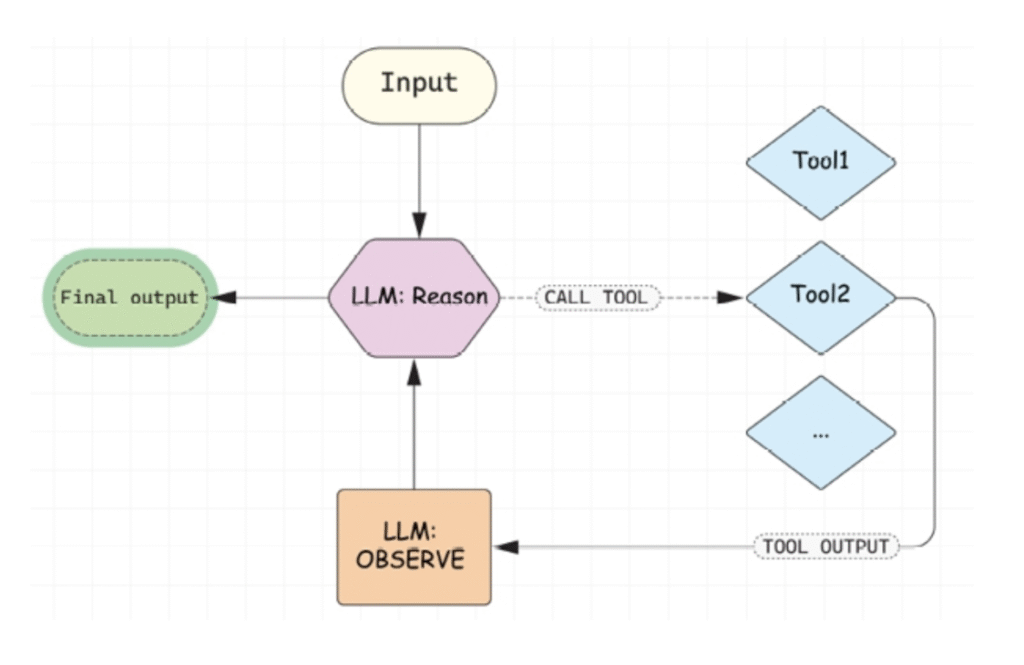
To really see an agent in the wild, let’s look at the ReAct (Reason + Act) concept, proposed in 2022 by researchers at Princeton University and Google Labs.
ReAct agents work on two simple principles:
-
Reasoning (Re): The LLM analyzes the situation (initial plan + tool results) and decides what to do next (provide the final answer or call more tools).
-
Acting (Act): Executing the chosen action.
Building a ReAct Agent (The Raw Way)
In LangChain, you can create a ReAct agent in one line of code using LangGraph, but to understand the logic, let’s look at how the « loop » actually works:
-
The
messagesvariable will store the entire conversation (human, AI, and tool outputs). It will be initiated by the user’s question -
Step 1: Give the list of
messagesto the llm.-
If it gives a final answer, we stop.
-
If it asks for tools execution, we move to Step 2.
-
Step 2: We loop through the requested tools, execute them, get the results, and create
ToolMessagesand add them to themessagesvariable. Then we go back to Step 1.
-
For our demo, we will ask the agent to calculate the logarithm of the US inflation rate for November 2025, it will first find the info on the web, then use a calculator for the exact result.
We’ll use two tools:
-
A Search Tool (it is a fake tool : it will return a static response).
-
A Logarithm Calculator
def fake_search_tool(query: str):
  return "Inflation rate in USA in november 2025 is equal to 2.9%"

def calculate_logarithme_tool(val: float):
  import math
  return math.log(val)

tool_by_name = {
    "google_search": fake_search_tool,
    "calculate_logarithm": calculate_logarithme_tool
}We will also define the openai format of our logarithmic calculator
calculate_logarithme_tool_description = {
  "type": "function",
  "function": {
    "name": "calculate_logarithm",
    "description": "Calculates the natural logarithm (ln) of a decimal number. Use this tool when the user asks for logarithmic math operations.",
    "parameters": {
      "type": "object",
      "properties": {
        "val": {
          "type": "number",
          "description": "The float number to calculate the logarithm for. Must be greater than 0."
        }
      },
      "required": ["val"]
    }
  }
}Here’s the code of our algo
llm_with_tool = llm.bind(tools=[search_tool_description, calculate_logarithme_tool_description])

question = "What is the logarithme of the inflation rate in novembre 2025 in USA ?"

messages = [HumanMessage(content=question)]

final_result = None
while final_result is None:
  llm_message = llm_with_tool.invoke(messages)
  messages.append(llm_message)
  if llm_message.tool_calls is not None and len(llm_message.tool_calls) > 0:
    for tool_call in llm_message.tool_calls:
        result = tool_by_name[tool_call["name"]](**tool_call["args"])
        messages.append(ToolMessage(content=result, tool=tool_call["name"], tool_call_id=tool_call["id"]))
  else:
    final_result = llm_message.content

# print the messages
for message in messages:
message.pretty_print()============== Human Message ==============
What is the logarithme of the inflation rate in novembre 2025 in USA ?
============== Ai Message ==============
Tool Calls:
google_search (call_bZ9nq726sChsfE9Zr4gr1Nha)
Call ID: call_bZ9nq726sChsfE9Zr4gr1Nha
Args:
query: USA inflation rate November 2025
============== Tool Message ==============
Inflation rate in USA in november 2025 is equal to 2.9%
============== Ai Message ==============
Tool Calls:
calculate_logarithm (call_tuirMHYqJrqYl9Q1fkztXCgL)
Call ID: call_tuirMHYqJrqYl9Q1fkztXCgL
Args:
val: 2.9
============== Tool Message ==============
1.0647107369924282
============== Ai Message ==============
The logarithm of the inflation rate in the USA for November 2025, which is 2.9%, is approximately 1.0647.
The Execution Flow:
-
The Question: « What is the log of the US inflation rate for Nov 2025? »
-
The Reasoning: The LLM realizes it needs the Search Engine.
-
The Action: It executes the search.
-
The New Reasoning: Seeing the 2.9% result, it asks for the calculate_logarithm tool.
-
The Action: It executes the calculator with
val = 2.9. -
Final Result: The LLM sees the final math and gives you the definitive answer.
By following this loop, the AI transforms from a simple storyteller into a problem-solver that interacts with reality.
Conclusion
We are witnessing a fundamental shift in the AI landscape. We’ve moved from « Prompt Engineering, » where we had to guide the AI’s every word, to « Agentic Workflows, » where we define a goal and let the AI find the best path to reach it.
By combining the reasoning power of LLMs with the practical capabilities of tools via LangChain and the ReAct framework, we are building more than just assistants—we are building partners. Whether it’s automating market research or managing complex logistics, AI agents are the bridge between a brilliant idea and its concrete execution.
The tools are ready, the logic is clear, and the efficiency gains are real. The only question left is: Which part of your workflow are you ready to delegate?
What’s next? Now that you understand the « brain » and the « nervous system » of an agent, it’s time to look at the « hands. » In my next post, I’ll be doing a deep dive into Tools: we’ll see how to build them from scratch, how to secure them, and how to make sure your agent uses them like a pro. Stay tuned!